

Apps / iPhone · iPad · Mac
Folucent
Read deeply. Keep what you learn.
Folucent is a quiet place to read PDFs and keep what you learn.
Availability, supported devices, and any purchases are shown on the App Store.
A CLOSER LOOK
Built for
your everyday.
READ WITH THE SOURCE CLOSE Import PDFs from Files, pick up where you left off, search passages, and keep bookmarks. Choose a grid or list library. Use two-page reading when space allows and keyboard shortcuts with a connected keyboard.
WORK WITH SCANNED PAGES Recognize text in page images, review the result, and use it in learning tools. Recognized page text is saved locally and can be found through search. The PDF keeps its original page layout.
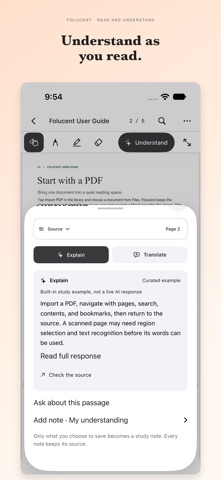
UNDERSTAND A PASSAGE Open Understand to explain a selected passage or the current text page. Keep the source collapsed while reading the explanation, expand it when needed, or choose Translate. After an explanation, use Ask about this passage to clarify a specific point. Choose Apple's on-device AI, Apple Private Cloud Compute, or your own OpenAI-compatible service. Custom services require an HTTPS address, model ID, API key and explicit permission to send text to that endpoint. The key stays in this device's Keychain; service availability, privacy and charges depend on the provider. Services never switch automatically. The included guide also offers clearly labelled built-in study examples. Learning actions use selected passages, not an entire book.
KEEP YOUR OWN UNDERSTANDING Write what an idea means to you, save a study note, and return to its source page. Search across PDF text, recognized text, highlights, and notes. Revisit notes through the review queue.
FOLUCENT PRO — ONE-TIME PURCHASE Optional Pro adds on-device whole-PDF translation with page-by-page progress and source comparison, cross-book study collections, PDF and Markdown study guides, saved guide templates, PDF reading aloud with sentence and paragraph controls, and a gold icon. Listen in the background on iPhone and iPad. iPhone/iPad can change the Home Screen icon; Mac customizes the running Dock icon only. Reading, annotations, OCR, notes, AI settings and standard exports remain free. Pro includes no AI credits; third-party AI fees are separate.
MAKE THE SPACE YOURS Start with a neutral interface or choose an optional color theme. Use light or dark appearance and larger text. On iPad, add handwriting to pages.
No account is required. Your library and notes are stored locally. Apple AI requires compatible hardware and supported system settings; PCC and custom services require network access. Unsupported or unconfigured AI actions are hidden while reading and notes remain available. App-level CloudKit sync is not configured. The interface supports English, Simplified Chinese, Traditional Chinese, Japanese, Korean, French, German and Spanish. Answer and translation languages can be chosen independently from the same eight options; support depends on the selected model. AI output requires comparison with the source.
Product information checked against the public App Store listing on November 11, 2026. The App Store has the latest release details.