Public catalog
Search applications, look up details, and find the latest external version ID without signing in. Select a storefront and request JSON output.
search · lookup · latest-version-idMACOS ARM64 · LINUX X86_64 · WINDOWS X86_64
Browse the App Store, download entitled IPA or Mac PKG packages, and prepare FairPlay decryption once. A native dark macOS desktop and CLI share the same Rust workflows.
Built on ipatool and UnfairPlay. For practical use, prefer the original projects.
$ ipatool-rs search ScriptWidget --platform macos
$ ipatool-rs auth login
$ ipatool-rs fairplay-doctor --help01 / CAPABILITIES
An experimental Rust rewrite of the combined ipatool-fairplay Go project, created to use otherwise-unused Codex quota and explore a substantial port. Full parity remains under validation.
Search applications, look up details, and find the latest external version ID without signing in. Select a storefront and request JSON output.
search · lookup · latest-version-idManage saved credentials, obtain free-app licenses, query purchases and versions, and download entitled IPA or Mac PKG packages with metadata and SINF handling.
auth · purchase · downloadSix App Store tools for compatible clients over standard input and output. Public search needs no account; authenticated tools use saved account state.
ipatool-rs mcp --non-interactiveGuided FairPlay setup saves a private model after validating a matching sample. Later matching IPA downloads decrypt automatically. Controlled macOS setup and independent reuse matched current UnfairPlay.
fairplay-doctor · fairplay-enroll · fairplay-decryptNATIVE DESKTOP / MACOS APPLE SILICON
Start with iOS search, sign in when needed, and keep downloads and FairPlay tasks in one place. The region follows your account; browsing another region shows a download warning.
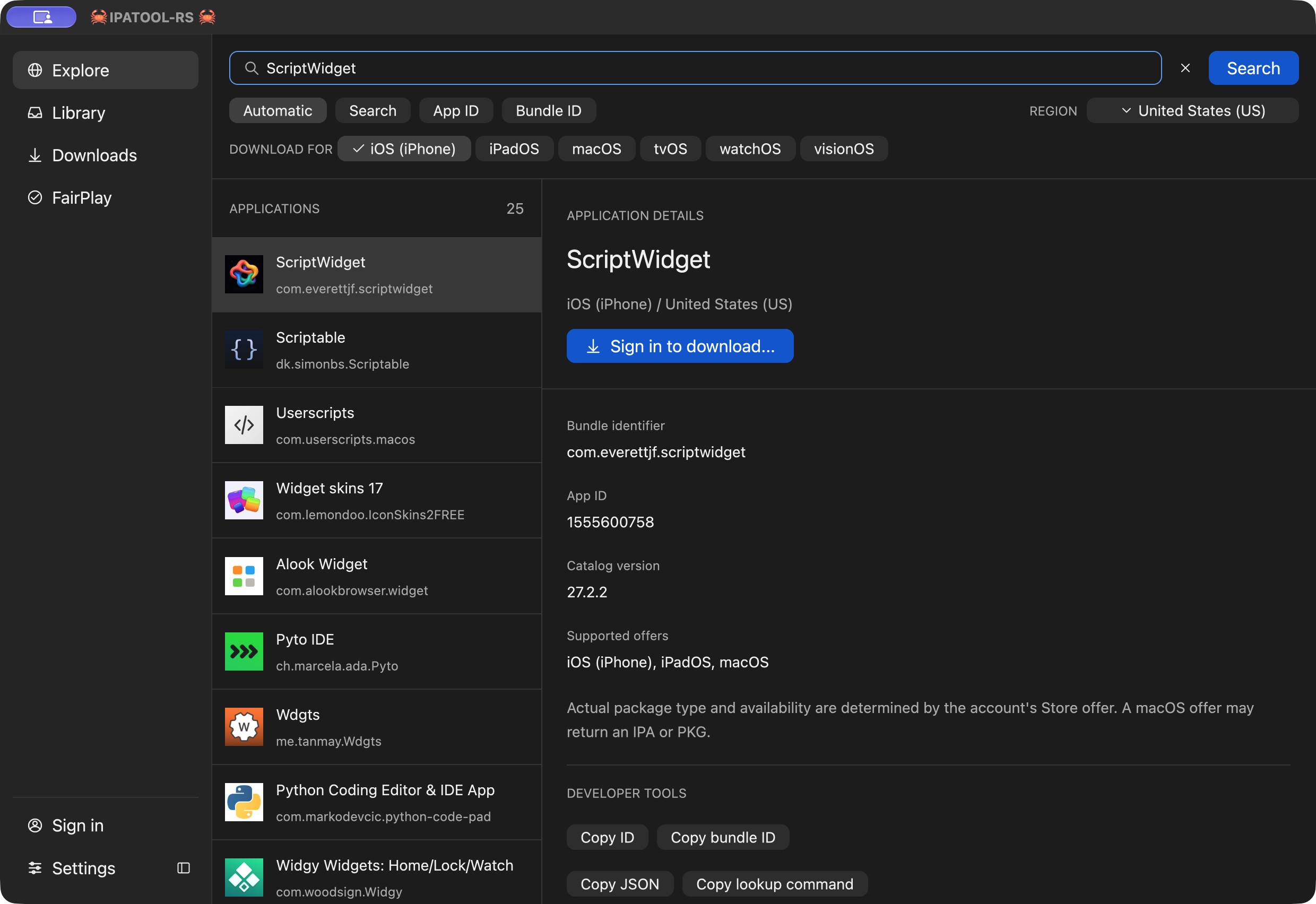
Search by name, App ID or bundle ID. iOS is selected at launch; change the platform or region to refresh results.
Sign in, choose a destination and follow progress. Existing files are preserved, and failed tasks explain the next step.
Choose a matching installed app and sample IPA. Approve scoped access when needed. A saved matching model handles later IPA downloads automatically.
FairPlay models remain private and authorization-specific. Setup requires compatible local App Store authorization, not just an IPA. The GUI keeps advanced controls collapsed. See the step-by-step FairPlay guide.
02 / INSTALL
The installed command is ipatool-rs, so it can coexist with the original ipatool.
Native desktop ZIP and CLI archive, Developer ID signed and notarized. Controlled account, download and FairPlay setup/reuse checked.
Desktop .zip / CLI .tar.gz ↗Native CI and public catalog checks pass. Live account and package workflows remain unverified.
Choose .tar.gz ↗Native CI and public catalog checks pass. Live account and package workflows remain unverified.
Choose .zip ↗brew tap everettjf/tap
# Desktop app
brew install --cask everettjf/tap/ipatool-rs-gui
# CLI (optional)
brew install everettjf/tap/ipatool-rs
ipatool-rs --versionOpen IPATOOL-RS from Applications after installing the cask. Requires macOS 12 or later; protected FairPlay setup requires macOS 13 or later. Upgrade with brew upgrade --cask everettjf/tap/ipatool-rs-gui or brew upgrade everettjf/tap/ipatool-rs.
For manual installation, download the archive and companion .sha256 file from Releases. Verify the checksum. For the GUI, extract *-gui-macos-arm64.zip and move IPATOOL-RS.app to Applications. For the CLI, extract and add the executable directory to your PATH. Windows uses ipatool-rs.exe.
macOS x86_64, Linux ARM64, Windows ARM64, and iOS runtime releases are deferred.
03 / QUICK START
ipatool-rs search ScriptWidget --platform macos --country US --limit 5
ipatool-rs lookup --app-id 1555600758 --platform macos --country US
ipatool-rs latest-version-id --app-id 1555600758 --platform macos --country USipatool-rs auth login
ipatool-rs auth info
ipatool-rs list-purchases --platform macos --max-results 2
ipatool-rs download --app-id 1555600758 --platform macos --output ./ScriptWidget.pkgEnter your Apple ID password and verification code at the interactive prompts. purchase obtains a free-app license; downloads require the appropriate account entitlement.
Native Mac apps such as ScriptWidget download as PKGs. Compatible iPhone or iPad offers can return IPAs; use --platform iphone for an entitled iPhone offer. This flag selects the Store offer, not the host operating system.
Use --format json for machine-readable output and ipatool-rs --help for all commands. Credentials use macOS Keychain, Linux Secret Service with an encrypted file fallback, or encrypted file storage on Windows. --file-keychain selects the file store explicitly.
The executable must be on the client's PATH, or use its absolute path.
{
  "mcpServers": {
    "ipatool-rs": {
      "command": "ipatool-rs",
      "args": ["mcp", "--non-interactive"]
    }
  }
}
Tools: search_apps, list_purchases, list_app_versions, get_version_metadata, purchase_app, and download_app. For encrypted file storage and non-interactive credential setup, see the README credential guide.
04 / ARCHITECTURE
The desktop, CLI and MCP server use the same Rust modules. Public catalog requests run directly, without a saved account or Apple guest execution.

Selected Store and SAP signing paths execute pinned ARM64 Apple framework images through Unicorn. Rust supplies image loading, execution control, and host-call models. No separate Go, Python, or Swift executable is launched.
FairPlay defaults to current-format recovery ported from pinned UnfairPlay, with matching samples and plaintext page-hash checks before model publication. The legacy exact-build fairplayd path remains explicit; support for arbitrary authorizations is not established.
05 / CURRENT LIMITS