

Apps / iPhone · iPad
Remoboard
Your computer keyboard. Your iPhone.
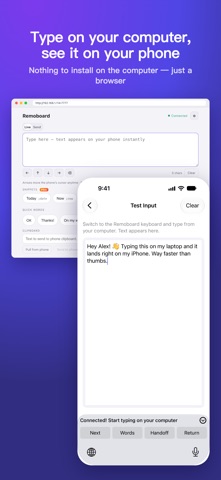
Remoboard turns your computer browser into a keyboard for your iPhone or iPad. Type in a text field on your device from a Mac, Windows, or Linux computer on the same Wi-Fi network. No desktop app or account is required.
Availability, supported devices, and any purchases are shown on the App Store.
A CLOSER LOOK
Built for
your everyday.
Getting started 1. Add the Remoboard keyboard in iOS or iPadOS Settings and allow Full Access for local network access. 2. Switch to the Remoboard keyboard in any text field. Open the URL shown on the keyboard in your computer browser. 3. If PIN pairing is enabled (on by default), enter the six-digit code shown on the keyboard, then start typing.
Features • Smoother Chinese and other composed text input. • Automatic reconnection and clear connection status. • Reusable phrases for text you type often. • Browser controls for text entry and clipboard actions. • Light and dark appearance, with support for 10 languages.
Both devices must be on the same local network. Full Access lets the keyboard serve its local page.
Remoboard Pro (optional one-time purchase) adds snippets, text expansion, trusted computers, image clipboard, split sending, send history and themes. Everything else is free.
Product information checked against the public App Store listing on November 11, 2026. The App Store has the latest release details.